

Did you know that URLs with relevant keywords can get up to 45% more clicks than generic ones? For any Shopify merchant, that statistic highlights a hidden opportunity right under your nose: the URL structure of your Shopify store.
It’s easy to focus on design and products and forget about the URLs. But a clear, descriptive URL does two crucial things: it makes your website easier for search engines to understand, and it builds instant trust with potential customers.
In this guide, we’ll break down the Shopify URL structure. You’ll learn the default setup, which parts you can update, which parts are fixed by Shopify, and the best practices to make your URLs work for you.
Why URL Structure Matters in Shopify
The structure of your store’s URLs plays a crucial role in building user trust and making navigation intuitive. Well-formatted, descriptive URLs help visitors understand where a URL will take them and also make it easier for search engines to crawl and index your pages. The reasons why it matters are listed below.
SEO Benefits of Clean, Structured URLs
With URLs, search engines are able to get an idea of what the page is all about. The URL needs to be clear and short, and contain the right keywords to guide the search engines effectively.
URLs that include relevant keywords can help search engines better understand the page content and improve visibility for those terms.
Readable URLs are easier to understand, remember, and share. That encourages more clicks and shares, which can indirectly improve site visibility.
In the case of Shopify stores, keeping product, collection, blog, and page URLs shorter, descriptive, and well-structured makes it easier for search engines to understand as well as provides a superior user experience.
Trust & Click-Through Rate Impact
People are much more likely to trust a link when it uses real, easy-to-read words. Random and unclear URLs create the opposite effect, which makes people think that the page is spam or fake.
Including descriptive titles on product and blog pages increases user trust and willingness to click. More trust and willingness often lead to higher click-through rates, which can signal relevance to search engines and contribute to stronger visibility.
Shopify store owners are able to use clear and descriptive URLs to get good first impressions, thus lowering bounce rate. That improves search engine trust.
Effects on Site Architecture & Crawling
Search engines crawl your site to find pages. The way your URLs are structured can either help or hinder this process.
Having a clean and easy-to-follow structure will allow search engines to find all your key pages, which will help with indexing and ranking.
URLs that are unclear or have too many layers can hinder search engines from accessing all of your content. For Shopify merchants, a strong Shopify URL structure ensures that products, blogs, and pages are exposed across search engines as frequently and comprehensively as possible.
The Default Shopify URL Structure
When you launch a Shopify store, the default domain usually looks like yourstorename.myshopify.com. This is your store’s address until you connect a custom domain.
Later, you can change it to something more brandable like: yourstorename.com
Your original yourstorename.myshopify.com will still exist in the background, but the custom domain becomes the main, customer-facing address.
This not only gives customers a cleaner, more professional experience but also strengthens your store’s branding and trust.
Beyond the main domain, Shopify also applies a default folder structure for products, collections, and other pages that we’ll explore next.
Product Page URLs
Shopify product pages use a fixed /products/ folder, plus a handle that you control. This ensures every product has a clear and consistent URL.
For example, if your store sells “Nike Shoes”, the URL would be: yourstorename.com/products/nike-shoes
Real Example:
Fashionnova selling the product Do Gooder Distressed Denim Jacket in black color and the URL structure is: fashionnova.com/products/do-gooder-distressed-denim-jacket-black

So, your Shopify product URL structure should be simple, descriptive, and readable. For example, performance-leggings instead of a random string of numbers.
Readable, keyword-rich URLs help search engines understand your page content, which can improve rankings and make it easier for customers to find your products.
Collection & Tag URLs
Collections use the /collections/ folder, followed by a handle you define.
For example, if your store creates a new collection page called “Sale”, then the URL would be:
yourstorename.com/collections/sale
Real example:
Gymshark has gymshark.com/collections/outlet-exclusives/mens for their sale/outlet collection for men.
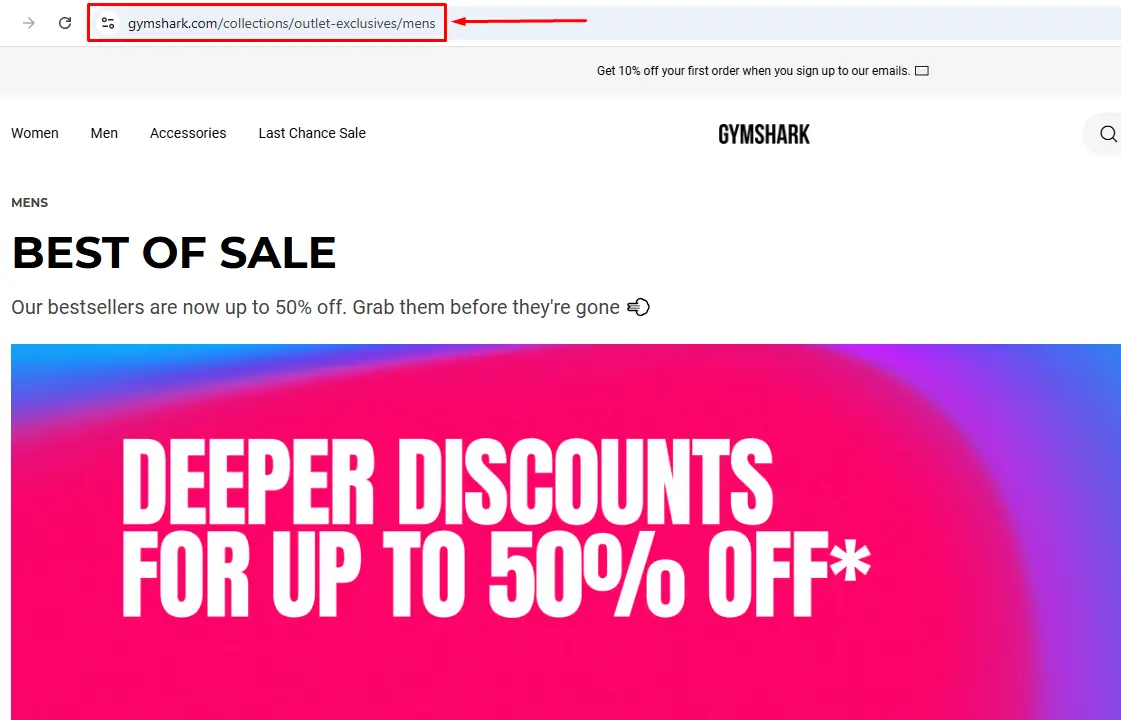
Within collections, Shopify also allows tags, such as /tags/red or /tags/large, mainly for filtering products. However, these URLs are not ideal for SEO or external linking.
The ideal URL should follow the format below:
mystore.com/collections/collection-name
Blog URLs
In Shopify, blog posts are organized under the /blogs/ directory, followed by the blog handle and the article handle. This structure is fixed and cannot be altered to remove the /blogs/ prefix

If your store has a blog named “fitness-tips” and publishes an article titled “The 10 Best Dumbbell Exercises for Stronger Legs,” the URL would be:
yourstorename.com/blogs/fitness-tips/the-10-best-dumbbell-exercises-for-stronger-legs
When creating blog URLs, use descriptive, keyword-rich handles for both the blog and the article. Avoid numbers or filler words, as clear and readable URLs make it easier for search engines to understand your content and improve visibility.
Page URLs
Static pages, such as About, Contact, or Policy pages, use the /pages/ folder followed by the page handle. These URLs are simpler because they represent standalone content rather than blog posts or collections.
For example, Kylie Cosmetics has pages like:
kyliecosmetics.com/pages/privacy-policy
kyliecosmetics.com/pages/shipping
kyliecosmetics.com/pages/contact
Using concise and descriptive page handles helps visitors understand the content of the page at a glance and improves overall site navigation and user trust.
How to Change Shopify Store’s URL Structure
While you can only edit the handle at the end of each URL, ensuring it’s done properly is essential for both usability and SEO.
How to Change Product Page URLs
To modify the product URL in your Shopify store, proceed as indicated below.
- Access your Shopify admin panel and navigate to the “Products” area.
- Choose the product whose URL you wish to change.
- Scroll down to the “Search engine listing preview” area.
- Press the “Edit website SEO” button.
- In the “URL and handle” field, you can edit the final part of the URL – the “[product-name]” part. This is the only aspect of the URL format that you can change on Shopify.
- Once you’ve made the edit, don’t forget to hit “Save” so the edit will be saved.
How to Change Collection URLs
If you don’t like the existing handle for an assortment, you can simply replace it. Here’s how:
- Sign in to your Shopify admin page.
- Navigate to “Products” > “Collections.”
- Select the collection you wish to edit and click on its name.
- In the “Collection details” area, you will find the existing “Handle” field.
- Update the handle to your preferred new value, according to best practice (see below).
- Click “Save” at the top of the page.
And you’re done! Your collection URL will then match the new handle you just created.
How to Change Blog URLs
It is possible to change a blog post URL in Shopify to enhance your SEO and make your links easier to use. To change the URL of a blog post in your Shopify store, just follow these easy steps:
- Log in to your Shopify store’s admin panel.
- Navigate to ‘Online Store’ and choose ‘Blog Posts’.
- Click on the blog whose URL you want to change.
- Scroll down to the ‘Search engine listing preview’ part.
- Click on the ‘Edit website SEO’ button.
- Under the ‘URL and handle’ section, modify the segment of the URL following /blogs/
These steps allow you to update any blog URL to be SEO-friendly and aligned with your content strategy.
How to Change Page URLs
- Navigate to Sales Channel > Online Store > Pages from the home page.
- Select the URL of the page you wish to modify from the list menu.
- To retype the page URL, visit the Search engine listing preview and choose “Edit Website SEO.”
- To change the page URL, go down to “URL and handle” and modify the editable text. Do not uncheck the URL redirect prompt.
- Finally, click ‘Save’ to apply your changes.
Best Practices for Shopify URL Structure
To optimize your Shopify URLs: keep them short and descriptive, include relevant keywords, avoid unnecessary numbers or special characters, and set up 301 redirects if you change any existing URLs.
Keep URLs Short, Descriptive, and Keyword-Rich
Aim for 2-4 words for a handle. Always add phrases your target audience searches for and skip filler words. Direct and strong phrases enable search engines and users to grasp the content of your webpage quickly. That improves your rank and helps to establish trust.
Good URL: mystore.com/products/silk-blue-dress
Bad URL: mystore.com/products/12345
Use Consistent Naming Conventions
Select one style and use it consistently. Use lowercase letters and hyphens between words. You should not mix styles or use spaces. Consistent names improve your site’s readability. This improves usability and enhances efficiency for both users and search bots as they navigate your pages.
Good URL:/collections/summer-sale
Bad URL: /collections/summer_sale
Avoid Dynamic URL Parameters When Possible
Symbol-containing or filtered URLs can be used for sorting, but avoid them for SEO or as anchor links. Use short, plain handles instead. Concise and clear page names and stable pages are favored by search engines. It minimizes duplicate content and improves crawlability on your site.
Redirect Old URLs When Changing URL Structure
Whenever you modify a handle, set up a redirect from the old URL to the new one to preserve traffic and SEO value. This way, users and search engines are directed to the new handle without error. Redirects protect your site’s traffic and rankings. Always monitor your redirect list to ensure nothing has been missed or broken.
- Navigate to Online Store > Navigation > URL Redirects.
- Input the old entire URL and the new URL.
- Click Add Redirect.
Wrapping Up
An effective Shopify URL structure benefits your store’s ranking, reputation, and performance. Every Shopify URL whether for a product or blog should be concise, keyword-rich, and well-structured.
Optimizing your Shopify URLs can boost visibility, attract clicks, and enhance user experience. Well-crafted URLs improve SEO, reduce bounce rates, and make your store appear more professional.